
Your week, out of your head
Most tradespeople run the diary from memory, a paper diary and a scroll through old texts. It works until it doesn't — the double-booking, the forgotten callback, the job that slipped a week without anyone telling the customer. Grafta puts the schedule in one place and keeps it honest.
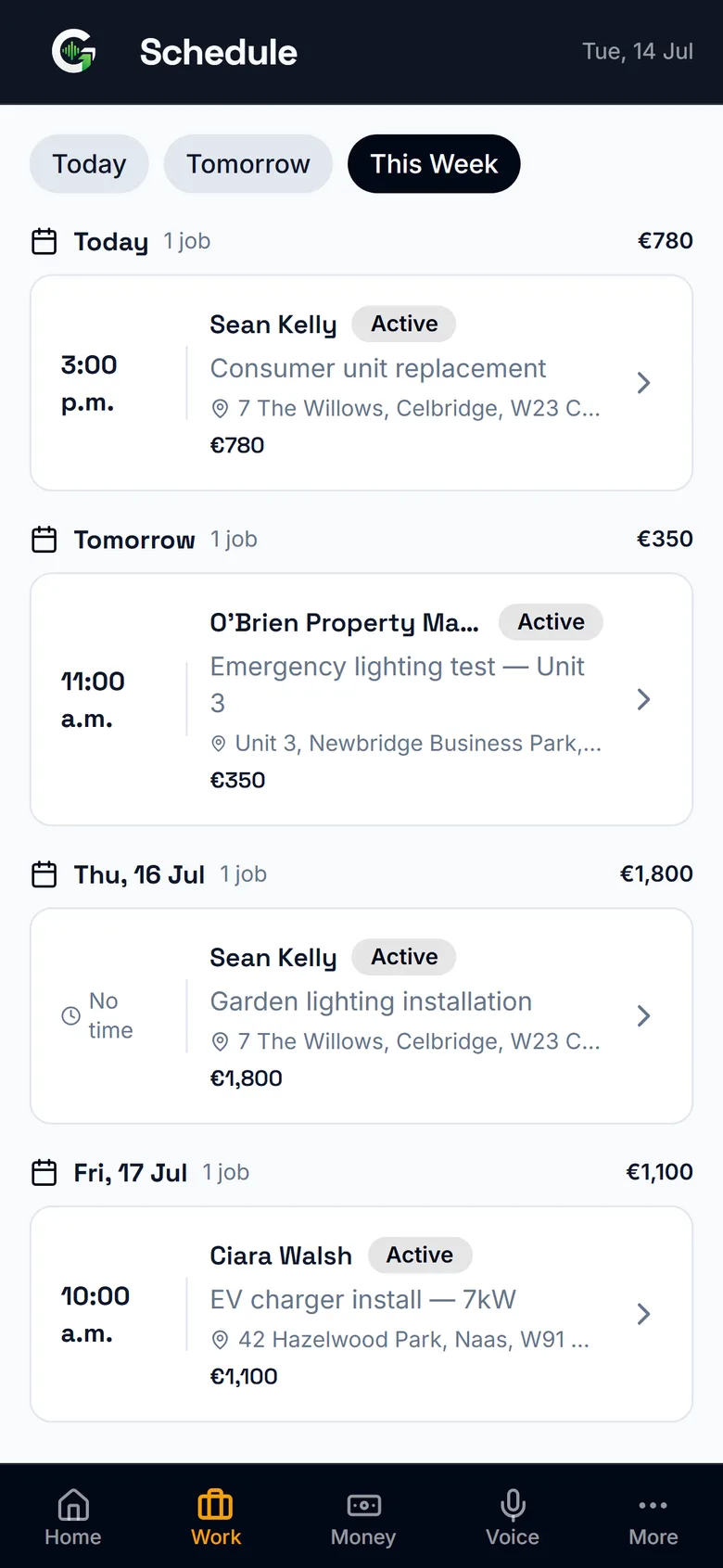
Today, this week, next month
See what's booked three ways — a month calendar you can page through, the week laid out day by day, or a single day in detail with addresses and values. Tap any date to open it, and page back through past weeks and months whenever you need to check what actually happened. It's the same data as your jobs list, so nothing has to be entered twice and nothing can disagree.
Plans change. So does the schedule.
Rain kills the roof day, a part doesn't arrive, an emergency jumps the queue — move the job and the week reshuffles around it. Because the schedule and the job are the same record, the new date is the truth everywhere, not a correction you have to remember to make twice.
"On my way" — one tap from the van
Heading to the next job? Open it, tap On my way, pick a rough ETA, and Grafta writes the text for you — "Hi Mary, on my way to you now — ETA about 20 minutes" — ready to send over WhatsApp or SMS. The customer isn't left wondering, and you're not thumbing out the same message ten times a day. You send it; Grafta never messages your customer for you.
One diary for the whole crew
On the Team plan everyone shares the schedule: you assign the jobs, the lads see their week and where to be. No more morning phone-around, no more group-chat archaeology to find out who's on the Naas job.
The week comes to you
Turn on notifications and your phone buzzes at 7 each morning with the day's jobs — before the first cup of tea, you know where you're going. Every Monday, Grafta emails you the week at a glance: what you're owed, which quotes are still waiting on a yes, and what's in the diary. And when a job lands in your schedule, the email comes with a calendar attachment — one tap adds it to the phone calendar you already use. One click unsubscribes you from the Monday email if it's not for you.
Good questions
Does the schedule work on my phone?
Yes — Grafta is phone-first. Check the day from the van, move a job from the site, book the callback while you're still at the door.
Will Grafta remind me what's on each day?
Yes — with notifications on, you get a push at 7am with the day's jobs, and a Monday morning email summing up the week: money owed, quotes awaiting a reply, jobs booked. The Monday email has a genuine one-click unsubscribe if you'd rather not get it.
Can my crew see the schedule?
On the Team plan, yes — everyone gets their own login and sees the shared schedule and their assigned jobs, while you keep control of quotes, invoices and money.
What happens to the schedule when a quote is accepted?
You turn the accepted quote into a job with one tap and book it straight in. The customer's details and the job's lines are already attached, so scheduling it is the last step, not another round of data entry.
Can I let a customer know I'm on my way?
Yes — open the job and tap "On my way", pick a rough ETA, and Grafta writes a ready-to-send WhatsApp or text. You tap send. Same one-you-send approach as everything else in Grafta — we never message your customer for you.
Related from Grafta
Everything else in the app
Try it on your next job
Start free — no card, no setup, your first quote in two minutes.
No card required. Cancel anytime.